



DocuFill
Make global edits of variable data quickly and easily.
$39 US Dollars per user licence, volume discounts available.
DocuFill displays a form showing all the variables in the active document ready for the user to type in, or select, replacement text. DocuFill infills this text into the document.
Simple enough, but the beauty of DocuFill is that it is so easy for administrators to markup variable text locations in a document.
All the administrator has to do to mark a variable is put the variable in square brackets e.g. [Start Date]. Then 'Start date' will appear as a prompt in the DocuFill dialog.
Thats it!
The user of the document presses the DocuFill button on the DocuFill toolbar and sees the DocuFill form. They type text for each variable and press OK. Data is populated into all the variables.
The administrator can set the variables to offer the user a drop-down list of choices in the form.
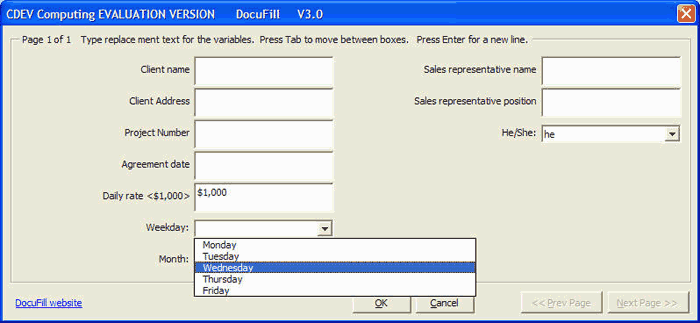
Furthermore as the user moves between the textboxes on the form so the document (which is visible on the lower half of the screen) scrolls to reveal the location and so the context of the variable. Further features allow the user to save the data they provided for the variables so that they can use that data for DocuFilling another document.
Very simple, very powerful.
DocuFill started life in 1996 and has undergone a process of continual development ever since.