

Here are just some of the clients we have delivered Word VBA training to:
Alenia Marconi
APACS
Archerwell
AREVA
Barlow Lyde & Gilbert
Barker Brettell LLP
BDO
BLG
British Medical Journal
Conwy Council
Corporation of London
EDS
Eric Robinson
Glaxo Wellcome
Halifax Bank
Hampshire Police
JGV
KPMG
Linklaters & Alliance
MAFF
Marsh
Microsoft
NPI
Oxford University Press
Stork Technical Services
Syngenta
Taylor & Francis
Total Gas
Vodafone
Zeneca
Word VBA Training
Our Word VBA course is designed to get participants up to a level where they can confidently code Word VBA solutions for themselves.
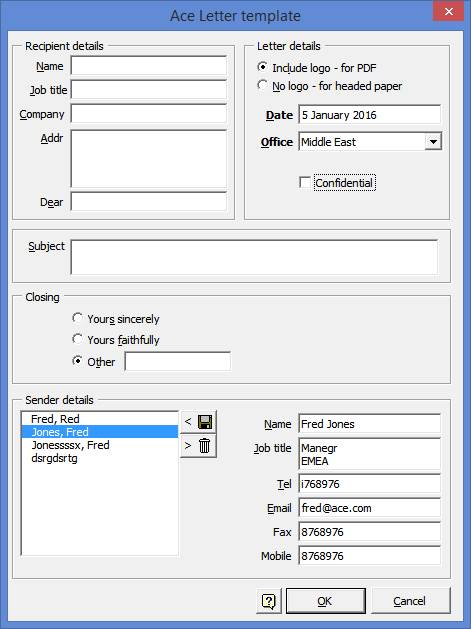
We cover all the basic skills required and culminate in the the creation of a template, such as a Letter, with an advanced custom front-end dialog, eg:
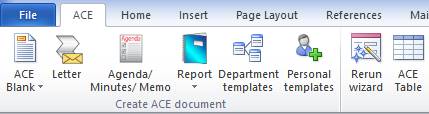
We also cover the creation of a custom Ribbon using xml.
The course can be focused on Word 2007, 2010 or 2013.
Who is the course for?
We tailor the course to meet the participant's level of experience. We can start with complete beginners and cover the basics of programming and we can take experienced VB programmers through to advanced Word topics.
The course is hands-on with each participant at a PC where together we code VBA solutions that can be taken away. Class notes are provided.
We supply up to three days of training, each being available separately. The first 2 days of which is sufficient to get participants up and running with VBA.
We encourage participants to bring along their own projects so that we can both tune the training even more closely to their requirements and get them off to a flying start with their project.
Location
We provide training at your company premises or at our training facility near Romsey, Southampton. Training can be on a one-to-one basis or classroom based with up to 6 participants.
Our training facility is very conveniently located very near to the M27 and airport with a hotel on site and free parking.
Post-training support
We provide telephone and email support to our participants following their training. A few words from an expert can be a great help in developing VBA solutions. We also write VBA code on a consultancy basis.
Course Description
Days |
Topics covered |
Day 1 |
Templates explained VBA development environment Create, edit, debug VBA code 'Record-and-help' code generation Introduction to the Word Object Model Simple custom forms - a Letter template |
Day 2 |
Create custom XML ribbon Advanced Word Object Model Selection vs Range Collections Storing information: registery, ini files, doc variables Advanced letter template dialog Installing and running Word over a network Global add-in templates |
Day 3 |
Advanced Ribbon features Class Modules Application Events Trust centre settings Setting up a document to best effect Database access: DAO, ADO Working on your project |
To find out more call Chris Devrell on +44 (0)2380 740990 or email: chris@cdev.co.uk.